
Quick Answer, NinjaTrader vs Sierra Chart vs Tradovate:
- NinjaTrader is the best balance of customization, automation, and prop firm support for serious retail futures traders in 2026.
- Sierra Chart is the standard for professional order flow traders who need the fastest tape and deepest charting precision available in retail software.
- Tradovate is the easiest cloud-based platform: zero installation, mobile-ready, and supported by almost every major US futures prop firm.
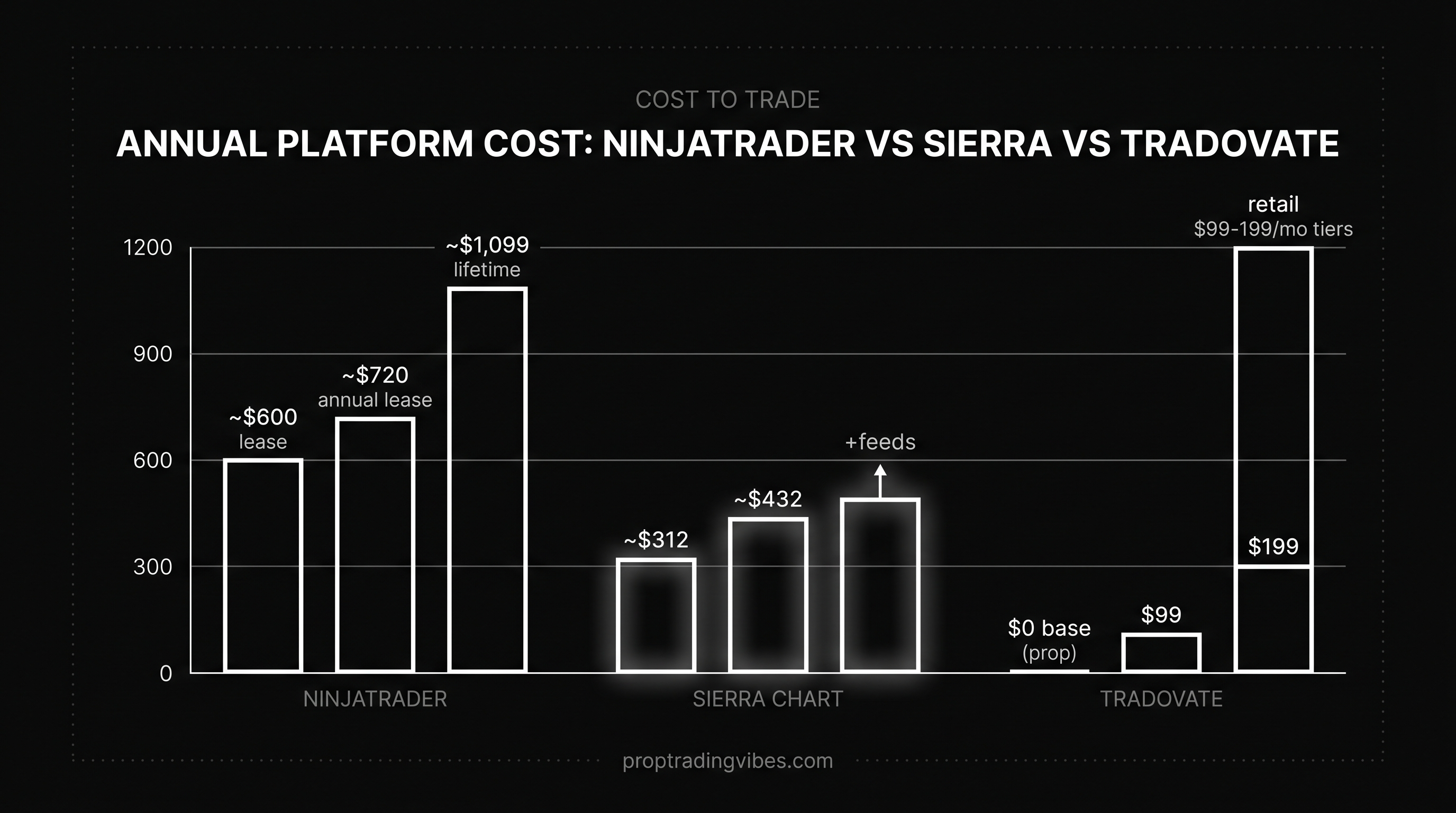
- As of June 2026, NinjaTrader sells a lifetime license around $1,099, Sierra Chart runs $26 to $36 per month, and Tradovate is free with a funded brokerage account.
- NinjaTrader Group acquired Tradovate in 2024, but the two products remain separate platforms with different feature sets and different user bases.
Quick Verdict: Which Platform Should You Pick
Pick NinjaTrader if you want a single desktop platform covering charting, automation, and most US futures prop firms without compromise.
Pick Sierra Chart if you trade order flow as your primary edge, you read the tape live, and chart accuracy matters more to you than UI polish.
Pick Tradovate if you want zero installation, fast prop firm onboarding, and mobile access.
The decision usually hinges on four questions:
- Discretionary or automated?
- Order flow footprint or pure price action?
- One machine or multiple devices?
- Windows or Mac?
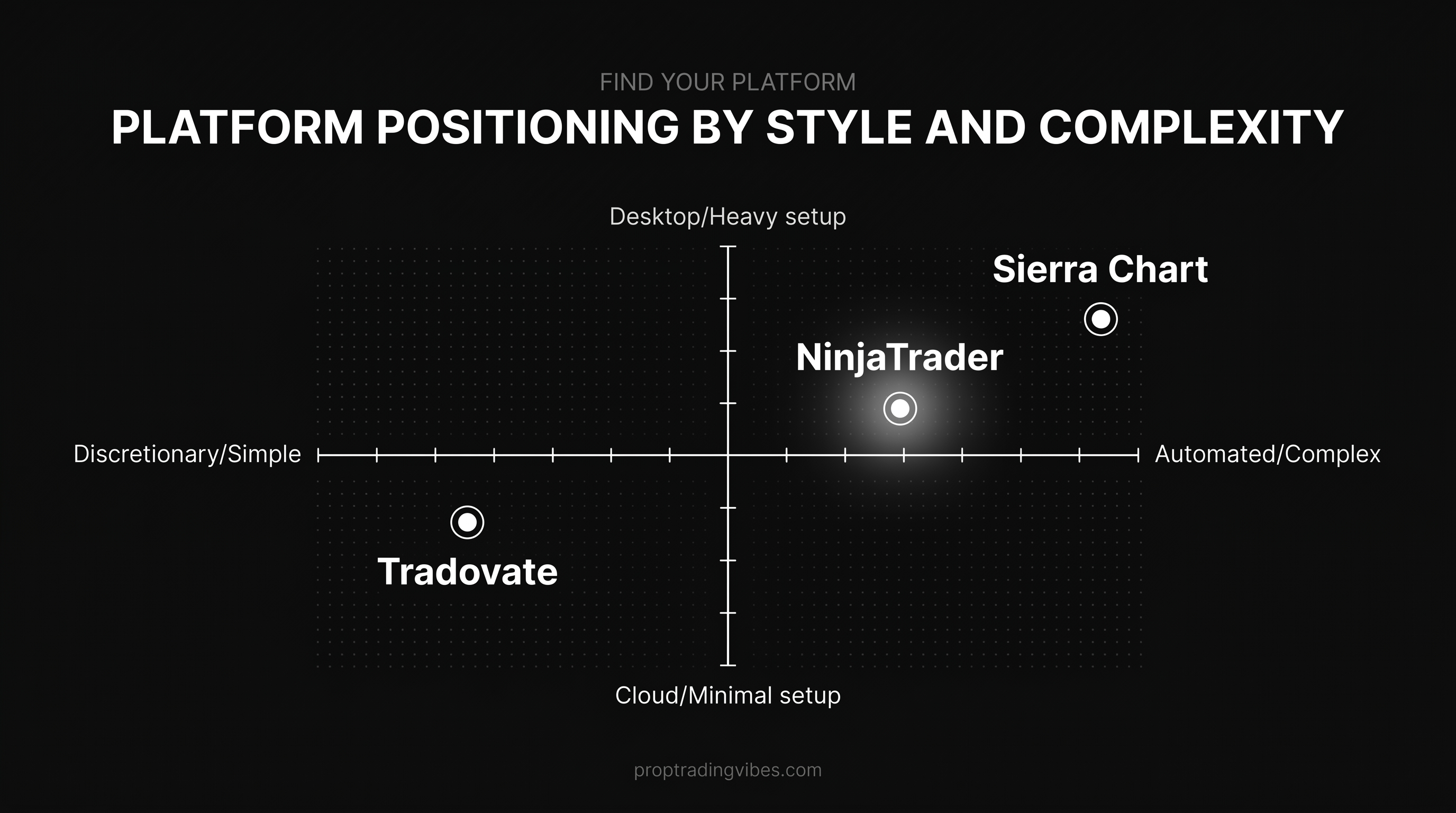
If you trade automated strategies on Windows: NinjaTrader. If you trade institutional-style order flow on Windows: Sierra Chart. If you trade discretionary on whatever device is in front of you: Tradovate.
Are NinjaTrader and Tradovate the Same?
No. NinjaTrader Group acquired Tradovate in 2024, but they remain separate products. NinjaTrader is a Windows desktop application with deep customization via NinjaScript. Tradovate is a cloud-native platform built around a web browser and mobile app. Different codebases, different user experiences, different use cases.
Platform Profiles at a Glance
| NinjaTrader | Sierra Chart | Tradovate | |
|---|---|---|---|
| Founded | 2003 | 1996 | 2015 |
| Architecture | Desktop (Windows-first) | Desktop (Windows only) | Cloud, web, mobile |
| Mac support | VM or VPS only | VM or VPS only | Native (any browser) |
| Pricing (June 2026) | ~$1,099 lifetime / ~$50/mo | ~$26-$36/mo packages | Free with funded account |
| Language | NinjaScript (C#) | ACSIL (C++) | Limited scripting |
| Order flow | Via paid add-ons | Native, best-in-class | Basic |
| Strategy automation | Full backtesting + live deploy | Full but C++ steep | Not for automation |
| Mobile app | None native | None | Yes, full-featured |
| Best fit | All-round retail futures | Professional order flow | Cloud-first prop firm trading |
NinjaTrader: What It Is and Who It's For
NinjaTrader is a Windows-first desktop platform launched in 2003 and headquartered in Denver. It combines charting, Advanced Trade Management (ATM), strategy automation via NinjaScript, and direct broker integration through NinjaTrader Brokerage, Continuum, and Rithmic.
Pricing
As of June 2026, the license options look like this:
- Lifetime license: ~$1,099 (best for 2+ years of active trading)
- Annual lease: ~$720
- Quarterly lease: ~$330
- Monthly lease: ~$50
- Charts + sim: Free, always
Live market data carries separate exchange fees regardless of which platform you use. That's not a NinjaTrader fee; it's CME/CBOT/NYMEX fees billed to whoever provides your data feed. Budget $20-$30/month per exchange at non-professional rates.
What NinjaTrader Does Well
The ATM module lets you build OCO brackets, breakeven moves, and trailing stops without writing a single line of code. NinjaScript (a C# dialect) handles full strategy automation, backtesting against multi-year futures data, and custom indicator development inside one application. The community is large, which means most problems you encounter have a forum answer already.
The workspace system is the underrated feature. Once you configure multiple workspaces for different instruments or session types, you load a full trading environment in two clicks. It rewards traders who invest setup time.
Where NinjaTrader Falls Short
Steep learning curve on day one. Windows-only natively (Mac requires Parallels, VMware Fusion, or a Windows VPS). The UI looks like a professional desktop application from 2015, not a modern web app. Order flow features exist but most serious footprint traders end up paying for add-ons like Order Flow Plus to match what Sierra Chart does natively.
For a deeper look at how NinjaTrader compares to alternatives outside these three, see the Deepcharts platform review and the Quantower review.
Sierra Chart: What It Is and Who It's For
Sierra Chart has been in continuous development since 1996. It runs on Windows only and is built around ACSIL, a C++ interface for custom studies and strategies. The reputation is simple and consistent: nothing else accessible to retail traders matches the charting precision and tape speed.
Pricing
As of June 2026:
- Standard package: ~$26/month
- Advanced package: ~$36/month
- Data feeds + exchange fees: Billed separately
Serious Sierra Chart users typically run multiple data feeds simultaneously. Total monthly cost for a professional setup often lands between $80 and $150 once feeds and exchange fees are included. You never own a license; it's a subscription.
What Sierra Chart Does Well
Native Numbers Bars, Volume by Price, and footprint charts are the reason professional tape readers stay on Sierra Chart despite the UI. The tape updates faster than most retail competitors. Every chart element is configurable to a depth that no other platform I've encountered comes close to.
Sierra Chart Trade Service, Rithmic, Teton, and CQG are the common data and broker connections. If you're a serious order flow trader, your setup probably involves multiple feeds running simultaneously.
Where Sierra Chart Falls Short
The interface looks like 1990s Windows software, and that description is accurate, not hyperbolic. Configuration menus are dense and documentation-heavy. No Mac support natively. No mobile version. ACSIL is C++, which is a meaningfully steeper commitment than NinjaScript's C#.
If you're reading this and you don't already know whether you need Sierra Chart, you probably don't. The traders who use it describe the same pattern: brutal to set up, nearly impossible to leave once configured.
Tradovate: What It Is and Who It's For
Tradovate is a cloud-based futures platform founded in 2015 in Chicago. It runs in any modern web browser, on a dedicated mobile app, and on an optional desktop client. NinjaTrader Group acquired Tradovate in 2024, but the two remain separate products with separate feature sets and user bases.
Pricing
Tradovate is free with a funded Tradovate brokerage account. Lifetime members pay no platform subscription. Other pricing tiers trade a monthly fee for reduced per-contract commissions, which matters at high volume on a retail account. For prop firm traders, you use the firm's commission schedule, not Tradovate's retail tiers. Functionally: free for most prop firm accounts.
What Tradovate Does Well
Zero installation. No patch days. No Windows VPS. The mobile app is one of the better futures trading mobile experiences available. Onboarding from account creation to placing a trade happens the same day, which is why prop firms keep adding Tradovate as a default option.
For traders running multiple prop firm evaluations simultaneously, Tradovate's fast account setup saves real time. Switching between Apex, Tradeify, or Bulenox accounts on Tradovate is faster than reconfiguring a NinjaTrader workspace from scratch for each firm.
Where Tradovate Falls Short
Strategy automation is limited. Order flow is basic. Customization is shallow next to NinjaScript or ACSIL. If you trade footprint, you'll outgrow Tradovate quickly. If you build automated strategies, Tradovate won't serve you for that purpose.
If you're evaluating other cloud-friendly platform options, the DXtrade platform review covers another cloud-native alternative used by several prop firms.
Charting and Order Flow: Side by Side
Order Flow Depth
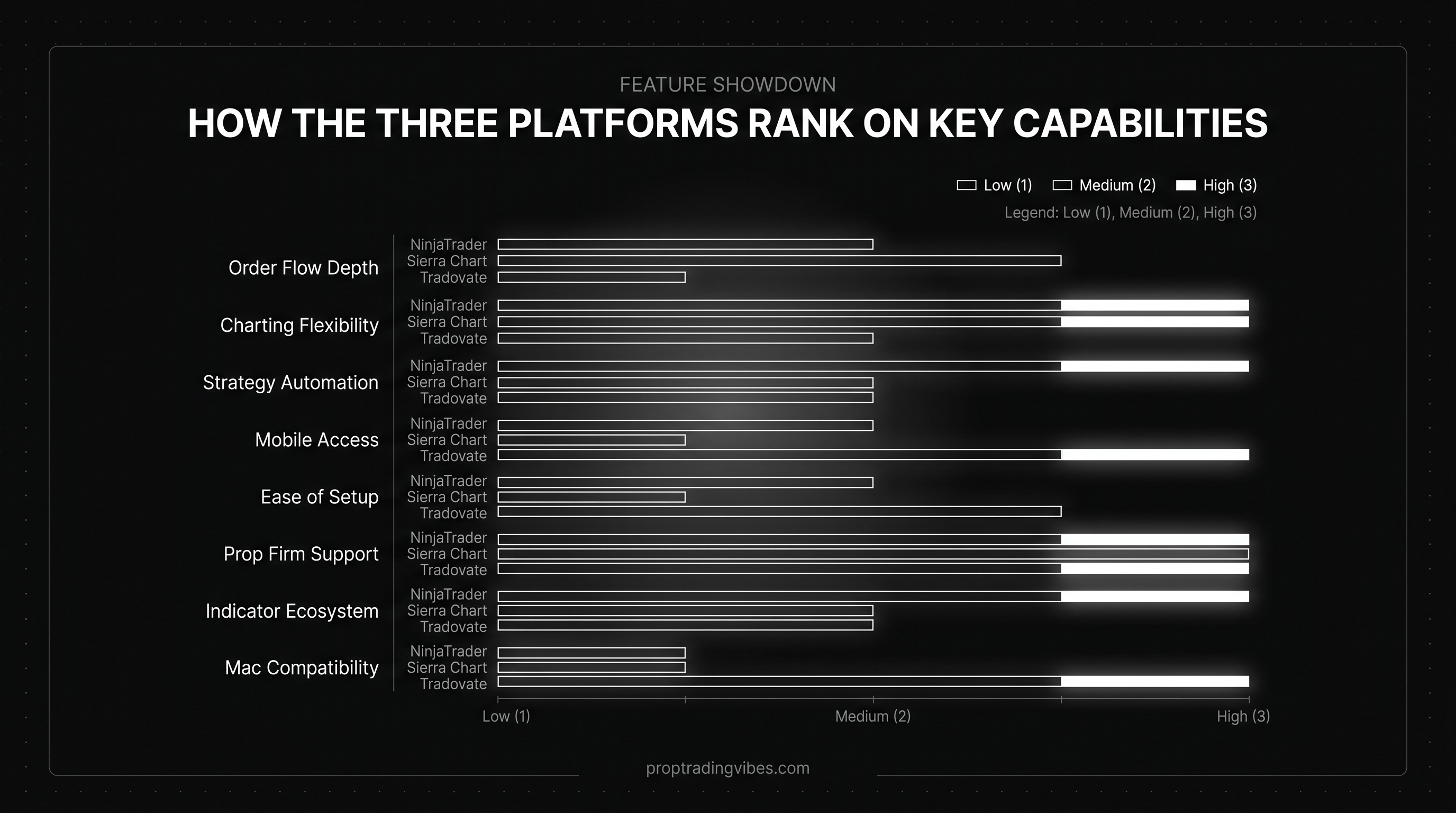
Sierra Chart wins this category without much debate. Native Numbers Bars, tape speed, and footprint precision are the reasons professional tape readers won't leave the platform regardless of the UI complaints. NinjaTrader gets close with paid add-ons (Order Flow Plus being the most common), but that's a $200-$400 add-on cost on top of the platform. Tradovate offers basic order flow features and stops there.
Charting Flexibility
NinjaTrader has the largest indicator ecosystem: native indicators, free community add-ons, and hundreds of paid third-party tools. The chart engine is highly customizable and reliable. Sierra Chart's charts are more precise but serve a narrower range of trading styles. Tradovate's charts are clean, modern, and sufficient for discretionary structure trading.
Backtesting
NinjaTrader's Strategy Analyzer handles multi-year backtests on futures tick data within the same platform you trade live. Sierra Chart's ACSIL supports the same but requires C++ development skills. Tradovate has no meaningful backtesting environment.
Strategy Automation Compared
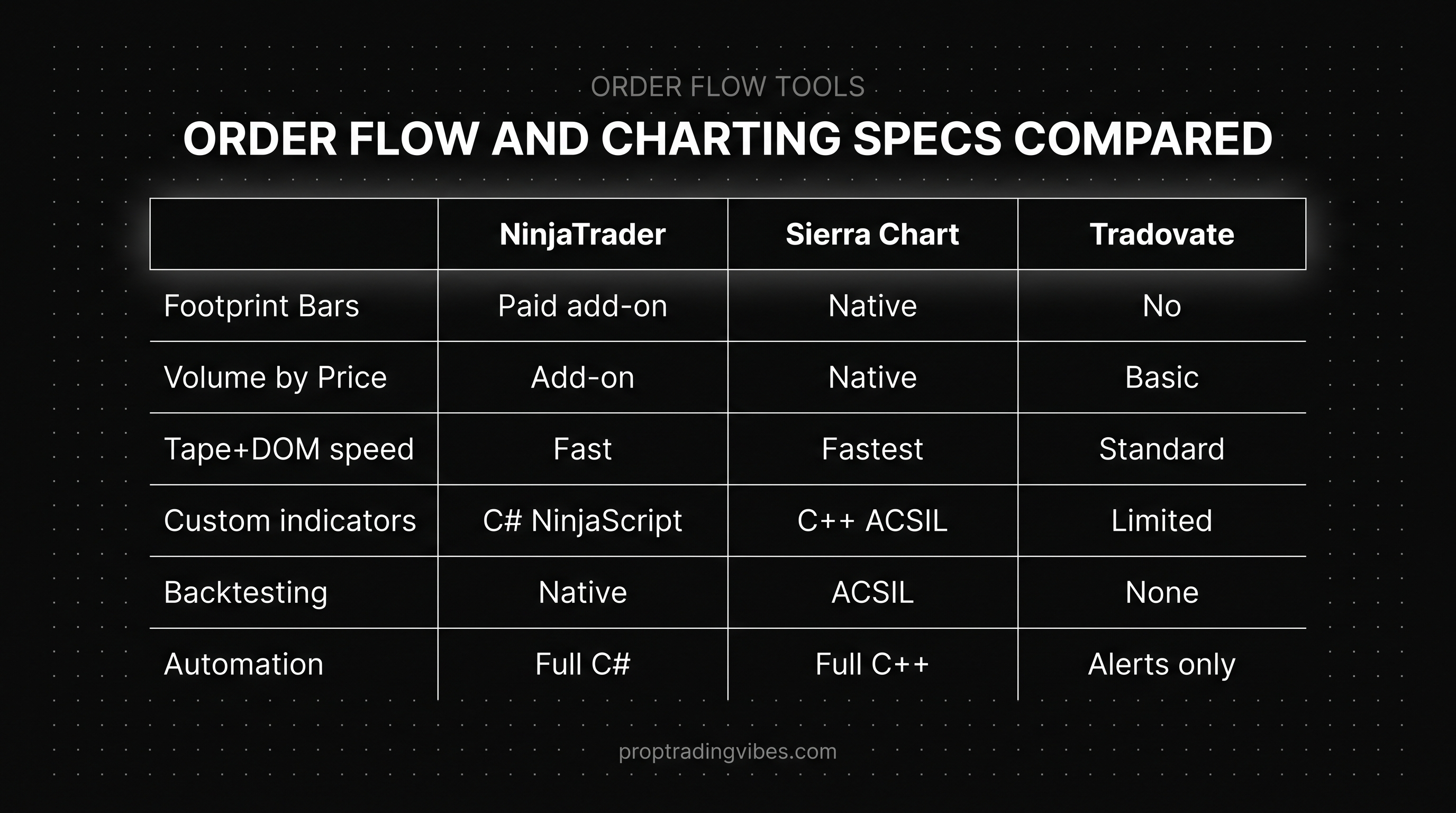
NinjaScript on NinjaTrader is the most accessible automation environment of the three. C# is widely documented, the NinjaTrader developer community is active, and the workflow from strategy idea to live deployment happens inside one tool.
ACSIL on Sierra Chart is more powerful but steeper. C++ developers who are already comfortable with the language can build tools with extreme performance characteristics. For most retail traders, the learning curve doesn't justify the effort when NinjaScript gets you 90% of the way there.
Tradovate is not an automation platform. Basic alerts and simple scripting exist, but you're not building a strategy engine there. Traders who want Tradovate's cloud workflow and also need automation typically develop on NinjaTrader and use Tradovate for execution on specific prop firm accounts.
Which Platform Works With Which Prop Firm
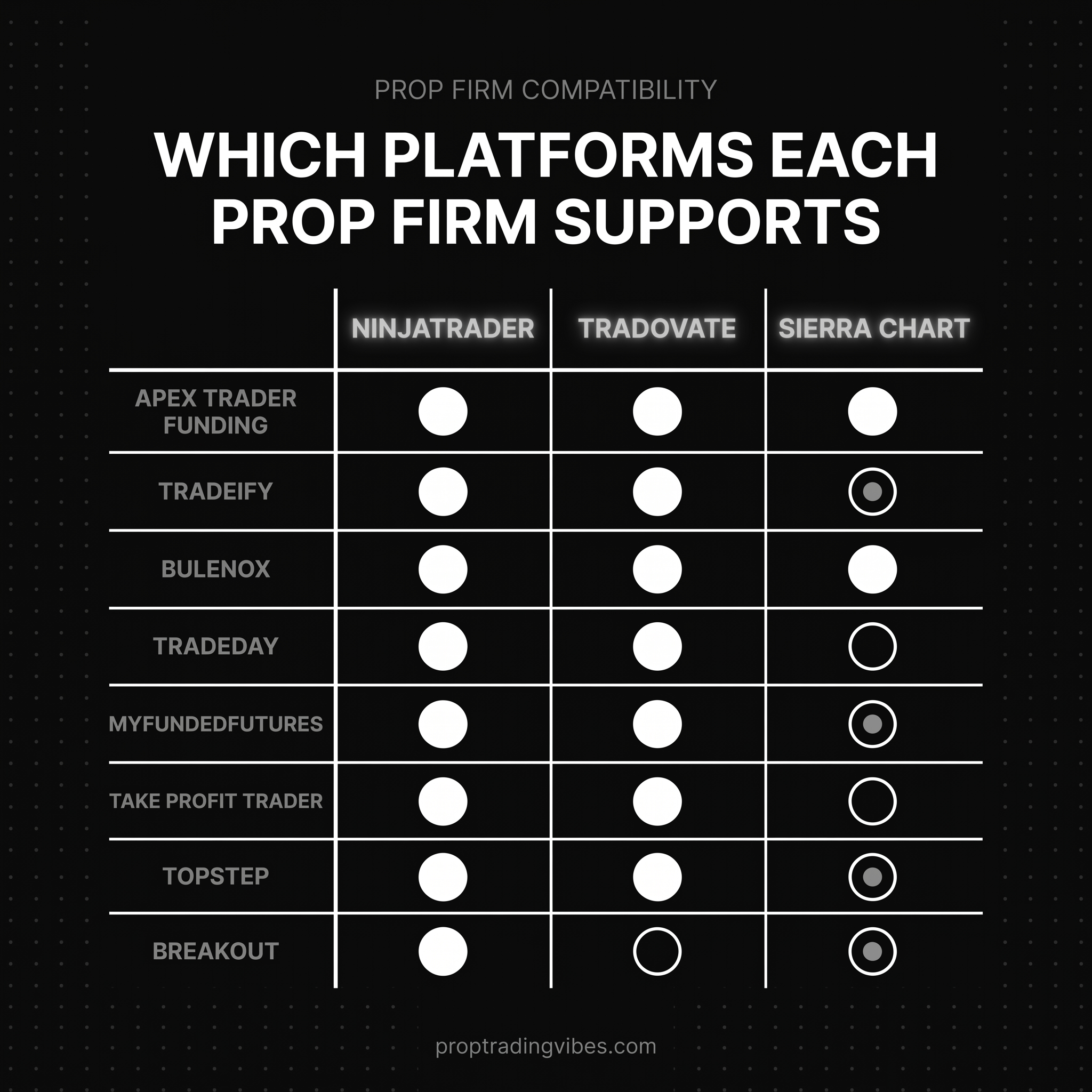
Most US futures prop firms support NinjaTrader and Tradovate. Sierra Chart almost never appears on standard prop firm menus.
| Prop Firm | NinjaTrader | Tradovate | Sierra Chart |
|---|---|---|---|
| Apex Trader Funding | Yes (via Rithmic) | Yes | No |
| Tradeify | Yes | Yes | No |
| Bulenox | Yes | Yes | No |
| TradeDay | Yes (NT8) | Yes | No |
| MyFundedFutures | Yes | No (uses Rithmic-based) | No |
| Take Profit Trader | Yes | Yes | No |
| Topstep | Yes | No (uses TopstepX) | No |
| Breakout | Varies | Varies | No |
Apex traders on NinjaTrader connect through Rithmic for live data on funded accounts. Topstep uses TopstepX as its native platform, with NinjaTrader and TradingView as alternates. MyFundedFutures routes through Rithmic-compatible platforms across seven supported applications.
If you're evaluating where each platform fits across the broader prop firm landscape, the Quantower review covers another Rithmic-compatible option with good prop firm support.
My Pick for Each Trader Profile
Beginner
Tradovate. No installation, browser-based, mobile app. You can open a sim or a small prop firm eval and be trading the same day. Once you know what you want from a platform, you upgrade.
Discretionary Day Trader
NinjaTrader on a lifetime license for high-frequency desktop use. Tradovate if you move between desktop and mobile regularly or run multiple prop firm evals simultaneously.
Order Flow Specialist
Sierra Chart. Nothing else in retail software gives you the same tape and footprint precision. The UI is rough on day one and invisible after a month.
Algo Trader
NinjaTrader with NinjaScript. The combination of native backtesting, live deployment, and broker integration through one platform is hard to replicate without building custom infrastructure. Sierra Chart with ACSIL if you're already writing C++.
Prop Firm Trader Running Multiple Evals
NinjaTrader plus Tradovate together. They cover almost all US futures prop firms. You can switch between them depending on which firm you're running without learning a new tool.
Common Platform-Switching Mistakes
Rebuilding the same chart and expecting the same result. Different platforms draw bars differently, update volume profiles differently, and handle tick data differently. Give yourself a week of sim time before trading live on a new platform.
Switching platforms to fix a trading problem. The platform is almost never the bottleneck. If you're failing evals on Tradovate, moving to NinjaTrader won't fix the underlying issue. Fix the trading first.
Underestimating data feed costs. Live CME data runs roughly $20-$30/month per exchange at non-professional rates. Pro status raises it significantly. Factor this into your total platform cost, especially on Sierra Chart where you may run multiple feeds simultaneously.
Ignoring prop firm platform constraints. If your firm doesn't support your platform, you can't use it on that account. Verify compatibility before committing to a platform for a specific firm. Topstep uses TopstepX, not Tradovate. MyFundedFutures uses Rithmic-compatible tools, not a NinjaTrader-only setup.
Trying to master three platforms at once. Pick one, get competent, then add a second only if you have a specific reason. NinjaTrader plus Tradovate is a strong combination. NinjaTrader plus Sierra Chart together is overkill unless you have a genuine need for both.
Frequently Asked Questions
Which is better, NinjaTrader or Tradovate?
NinjaTrader is better for customization, strategy automation, and advanced charting. Tradovate is better for cloud-based access, mobile trading, and zero-install onboarding. Both are owned by NinjaTrader Group since the 2024 acquisition and both work with most major US futures prop firms in 2026. The choice depends on whether you prioritize desktop power or cloud flexibility.
Is Sierra Chart better than NinjaTrader?
Sierra Chart is better than NinjaTrader for raw charting performance, native order flow tools, and tape-reading precision. NinjaTrader is better for ease of use, broader prop firm support, strategy automation in C#, and a less dated interface. Which is "better" depends entirely on your trading style. Professional tape readers typically choose Sierra Chart. Most retail futures traders choose NinjaTrader.
Is Tradovate the same as NinjaTrader?
No. NinjaTrader Group acquired Tradovate in 2024, but the two products remain separate. NinjaTrader is a Windows desktop application customized through NinjaScript. Tradovate is a cloud-native platform built around a browser and mobile app. They have different feature sets, different pricing models, and different user bases.
What does NinjaTrader cost in 2026?
As of June 2026, NinjaTrader offers a lifetime license around $1,099, an annual lease around $720, a quarterly lease around $330, and a monthly lease around $50. Charts and simulation are free. Live market data carries separate exchange fees that apply regardless of which platform you trade on. Verify current pricing at ninjatrader.com.
What does Sierra Chart cost in 2026?
As of June 2026, Sierra Chart pricing starts at approximately $26/month for the Standard service package and roughly $36/month for the Advanced package. Data feeds and exchange fees are billed separately and can add $40-$100/month for a professional multi-feed setup. Verify current pricing at sierrachart.com.
What does Tradovate cost in 2026?
Tradovate is free with a funded Tradovate brokerage account. Lifetime members pay no platform fee. Other pricing tiers reduce per-contract commissions in exchange for a monthly subscription, relevant for high-volume retail accounts. Prop firm accounts use the firm's commission schedule rather than Tradovate's retail tiers, making Tradovate effectively free for most prop firm traders.
Which platform do prop firms support most in 2026?
Most US futures prop firms support NinjaTrader and Tradovate. Apex Trader Funding, Tradeify, and Bulenox all offer both. TradeDay supports NinjaTrader (NT8). Topstep uses its own TopstepX platform with NinjaTrader as an alternate. Sierra Chart is rare on retail prop firm menus. If you're trading multiple US prop firms, NinjaTrader plus Tradovate covers almost all of them.
Can I run NinjaTrader on a Mac?
NinjaTrader does not run natively on macOS. Mac traders run it inside a virtual machine using Parallels or VMware Fusion, or on a Windows VPS. Sierra Chart is also Windows-only with the same workaround. Tradovate runs natively in any web browser on Mac, including Safari, making it the only one of the three with true native Mac support.
Which platform has the best order flow tools?
Sierra Chart has the most respected native order flow tools: Numbers Bars, Volume by Price, and high-resolution footprint charts. The tape update speed is faster than most retail competitors. NinjaTrader supports order flow through paid add-ons like Order Flow Plus, which gets you close but at additional cost. Tradovate offers basic order flow features and is not the platform of choice for serious tape readers.
Should a beginner start on NinjaTrader, Sierra Chart, or Tradovate?
Start on Tradovate. The cloud-based interface, mobile app, and integrated prop firm onboarding remove the friction of installing desktop software. Beginners who already know they want full customization can start on NinjaTrader. Sierra Chart is almost never the right starting point for new futures traders. Learn the market first, then optimize the tooling.
